
Step-by-Step Setup
Product Overview
Watch EazyMatch AI in Action
See how EazyMatch AI connects to Pipedrive, scans your CRM, identifies duplicates, enriches missing data, and supports GDPR readiness.
Setup Steps
Connect EazyMatch AI to Pipedrive
Follow these steps to create your account, connect your Pipedrive portal, and run your first scan.
Step 1
Create Your Account and Choose a Plan
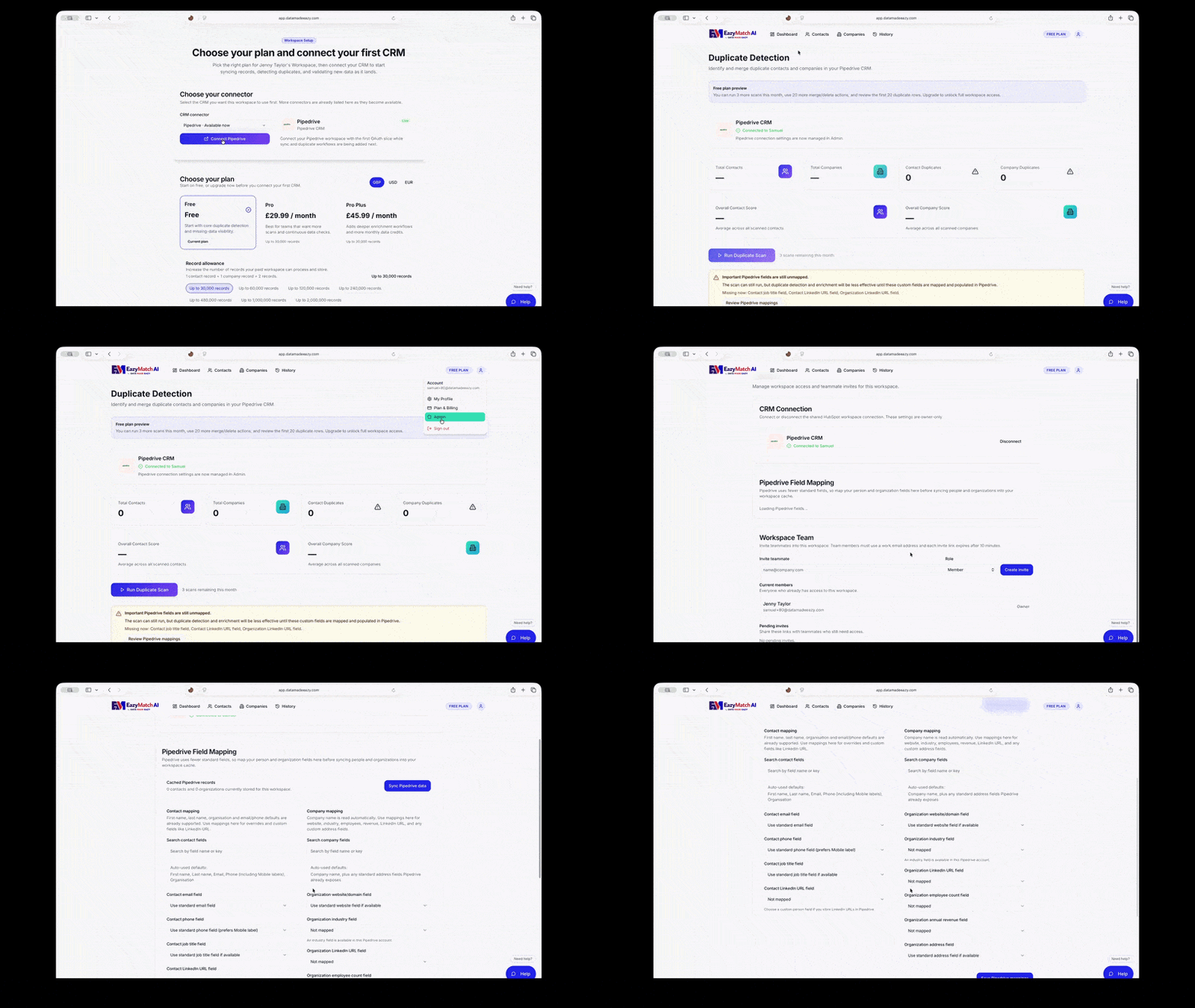
Start by creating your EazyMatch AI account and logging in to the platform. Once logged in, choose the plan that best fits your needs. If you are just getting started, you can begin with the free plan and upgrade later if needed.

Step 2
Select the Pipedrive Connector and Authorise the Connection
After logging in, choose the Pipedrive connector from the available integrations. Follow the prompts to authorise EazyMatch AI to connect to your Pipedrive account. Once approved, your Pipedrive records will sync with EazyMatch AI so you can begin reviewing duplicates, missing data, enrichment opportunities, and retention policy checks.
Step 3
Run Your First Scan
Once your Pipedrive account is connected, run your first scan to analyse your CRM data. EazyMatch AI will review your synced records and prepare your dashboard so you can start identifying duplicate contacts and companies, incomplete records, enrichment opportunities, and retention policy issues.
After Your First Scan
What You’ll See After Your First Scan
Once your first scan is complete, EazyMatch AI gives you a clear overview of your CRM data quality. You can see how many contact and company records you have, how many potential duplicates have been identified, and where missing information may be affecting your overall data score.
Data Score
Get a Clear View of Your CRM Data Quality
The main dashboard gives you an instant overview of your CRM data quality, including your overall data score, the total number of contacts and companies, and the number of records that may need attention. This helps teams quickly understand where data quality issues exist and where to focus first.

Duplicate Contacts
Review and Manage Potential Duplicate Contacts
Review potential duplicate contacts, see how each match was identified, and use the confidence score to help guide your decision. From there, you can compare records side by side and decide whether to merge them or delete one of the duplicates.

Duplicate Companies
Review Potential Duplicate Company Records
The same process can be used for company records. Review potential duplicate companies side by side, compare their details clearly, and decide whether to merge the records or delete one of them.

Missing Information
Identify Records with Missing Key Data
EazyMatch AI also highlights records with missing information that may be affecting your data score. You can review missing fields such as email address, mobile number, job title, LinkedIn URL, website, industry, and more, then export those records if needed for follow-up or review.

Other Key Features
More AI Data Cleaning Features for Pipedrive
EazyMatch AI helps Pipedrive teams do more than identify duplicates. You can enrich missing CRM data through Apollo, standardise job titles, fix name capitalisation, review records against retention policies, and manage workspace settings directly from EazyMatch AI.
Apollo Data Enrichment
Fill Missing Pipedrive Data Without Leaving EazyMatch AI
The Apollo integration helps customers improve incomplete Pipedrive records directly from EazyMatch AI. You can enrich missing People and Organisation information, review suggested values, and apply updates individually or in bulk.
EazyMatch AI can suggest useful missing details such as job titles, LinkedIn URLs, industry, employee count, revenue and address information. Suggestions are only made for blank Pipedrive fields, helping protect the data already stored in your CRM.
Workspace administrators can connect Apollo separately for each workspace, map Apollo industries to their Pipedrive taxonomy, and review changes before anything is written back.

Job Title Standardisation
Turn Messy Job Titles into Cleaner Segments
Pipedrive job titles are often inconsistent, incomplete or written in different formats. EazyMatch AI helps standardise job titles so sales and marketing teams can segment People more accurately and report with greater confidence.
Similar titles can be reviewed and grouped into cleaner, more consistent categories, helping reduce messy free-text values across your CRM.
This supports better targeting, cleaner reporting, improved ICP analysis and more reliable campaign segmentation in Pipedrive.

Name Capitalisation
Clean Up People Names for Better CRM Quality
People names are often entered in different formats, with inconsistent capitalisation across first names, last names and full names. EazyMatch AI helps identify name formatting issues so your Pipedrive records look cleaner and more professional.
Cleaner name formatting can improve CRM presentation, email personalisation, reporting and day-to-day user confidence in the data.
Users can review suggested changes before approved updates are applied back into Pipedrive, keeping data cleaning controlled and intentional.

GDPR Readiness
Review Records Against Your Retention Policy
EazyMatch AI helps teams support GDPR readiness by allowing them to set retention policies for customer, prospect and inactive records in Pipedrive.
You then receive an overall score showing how your data is performing against those retention rules, giving you a clearer view of how well your records are aligned.
EazyMatch AI also flags records that have gone past their retention date, helping users quickly identify records that may need review or action.

Admin Controls
Manage Users, Connections and Workspace Settings
EazyMatch AI gives admins control over users, connection settings and workspace management. Admins can add users, manage access across the workspace, and manage Pipedrive and enrichment connections when required.
Users can also navigate to their profile settings to delete their profile. If the admin deletes their profile, the workspace and associated data are removed as well.
This keeps AI data cleaning, enrichment and Pipedrive updates controlled at workspace level, helping teams improve data quality without losing governance.

