
CRM Data Deduplication Best Practices
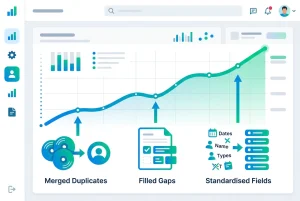
Every sales ops team eventually runs a CRM cleanup. Duplicates get merged, gaps get filled, job titles get standardised, and for a few weeks the database looks the way it should. Then new records start coming in through forms, imports, and integrations, and six months later the same team is scoping the same project again.
The cleanup itself is rarely the problem. What's usually missing is a set of CRM data deduplication best practices that keep the database clean after the first pass, not just during it. This guide covers both: how to run the cleanup properly, and how to stop it from becoming a recurring project.
Why a One-Time Cleanup Doesn't Hold
A CRM accumulates duplicates continuously, not in one event. Every form submission that doesn't match against an existing contact, every list import from an event or a partnership, every rep who creates a new record instead of searching for an existing one, adds to the total. A single cleanup addresses the backlog at one point in time and does nothing to slow the rate new duplicates enter afterward.
That's the core distinction behind real CRM data deduplication best practices: the goal isn't a clean database on one specific day, it's a database that stays within an acceptable range of clean on every day.
CRM Data Deduplication Best Practices, in Order
1. Match on more than exact email. Exact-match logic, which is what most native CRM duplicate tools default to, misses contacts that are clearly the same person but entered with different information — an email address on one record, a LinkedIn URL on the other, for example. Matching should also check similar name within the same company, partial name match, and mobile number.
2. Deduplicate companies as well as contacts. Company duplicates get less attention but cause identical problems — deals and contacts split across "Acme Ltd" and "Acme Limited" as two separate organisations, with revenue attribution divided between them. Match on LinkedIn company URL and website domain.
3. Review before merging, always. Automatic merging without review risks combining two different people who share a name and company. A queued review step, where a person confirms the match before anything changes, protects against this without slowing detection down.
4. Preserve deal and activity history on merge. When two records combine, notes, deal history, and activity timelines from both need to carry over to the surviving record. Losing this data during a merge creates a different problem than the duplicate did.
5. Fix completeness alongside uniqueness. Merging duplicates without addressing missing fields — email, company, job title — leaves records that are unique but still unusable for the workflows built on top of those fields.
6. Standardise formatting as a separate, recurring pass. Job titles, company name formats, and phone number formats drift out of consistency continuously, even in a database with no duplicates. This needs its own recurring check, not a one-time fix bundled into the dedup project.
7. Run detection on a schedule, not as a project. The single biggest shift from a one-time cleanup to lasting CRM data deduplication best practices is treating detection as an ongoing, scheduled process rather than a project with a start and end date.
Who Should Own This
In most organisations, sales ops or RevOps owns the process, since they're closest to how CRM data quality affects pipeline reporting and automation reliability. Marketing ops is usually the second stakeholder, since list segmentation and personalisation depend on the same underlying data. Whoever owns it, the process holds up best when one team is accountable for reviewing the queue on a set cadence, rather than cleanup being everyone's occasional responsibility and no one's regular one.
How EazyMatch AI Supports These Practices
EazyMatch AI is built around this exact model: continuous detection, human-reviewed merges, and coverage across both contacts and companies, for HubSpot and Pipedrive.
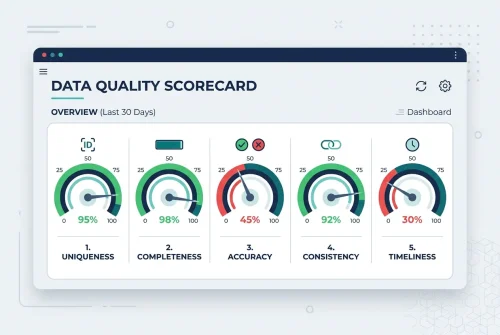
Duplicate detection uses multi-field AI matching across email, similar name within the same company, partial name match, LinkedIn URL, and mobile number for contacts, and LinkedIn company URL and website domain for companies. Missing data detection flags incomplete records, data quality scoring gives a before-and-after baseline, and job title standardisation runs in bulk rather than record by record.
Nothing merges or updates automatically. Every suggestion is reviewed and approved by a person before it syncs back to your CRM.
Step 1: Connect your CRM (HubSpot or Pipedrive)
Step 2: Run checks across contacts and companies
Step 3: Review the queue of duplicates, gaps, and inconsistencies
Step 4: Approve updates, which only apply once you sign off
Try EazyMatch AI free →
Run a baseline data quality check on your CRM. No credit card required.
FAQ
Q: How often should CRM data deduplication run?
A: Weekly checks work well for most sales ops teams. High-volume portals with heavy form or import activity benefit from daily checks, since duplicates and gaps accumulate continuously rather than in batches.
Q: What's the biggest mistake teams make with CRM data deduplication?
A: Treating it as a one-time project rather than an ongoing process. A cleanup that isn't followed by recurring checks degrades back to its previous state within a few months.
Q: Should merges ever be fully automatic?
A: Generally not recommended. A review step catches false-positive matches before they reach your CRM, and the small amount of review time is worth the protection against merging two different people by mistake.
Make the Cleanup the Last One You Need
CRM data deduplication best practices only pay off when they outlast the initial cleanup project. For the mechanics of running the first pass, see the guide to finding and merging duplicate contacts in HubSpot or how to remove duplicates in Pipedrive without losing deal history. To turn the process into something ongoing rather than recurring from scratch, see how to set up CRM duplicate records automation.
Try EazyMatch AI free →
Start with a baseline check and keep your database clean going forward.