

AI Data Matching CRM: Which Wins?
If you have ever tried to clean up duplicates in HubSpot or Pipedrive, you have already run into the limits of what the native tools can handle. They catch the obvious cases — two records with the same email address — and quietly miss everything else.
That gap between what rule-based tools find and what actually exists in your database is where most CRM data problems live. It is also where AI data matching CRM tools come in.
This post breaks down what each approach actually does, where rule-based logic falls short, and when AI matching is the right call for your team. For the broader trend behind this shift, see how AI is changing RevOps and CRM data management.
How Rule-Based Deduplication Works
Rule-based deduplication is exactly what the name suggests: a fixed set of conditions that determine whether two records are duplicates.
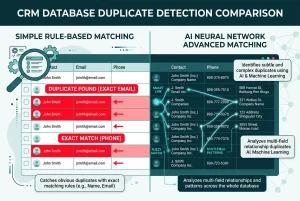
The most common rule is email address matching. If two contacts share the same email, the system flags them as duplicates. If they do not, they are treated as separate people. Some tools extend this to phone number or name plus company, but the logic remains the same. Each rule is binary: it matches or it does not.
This approach is fast, simple, and effective in tightly controlled environments. But it has a hard ceiling. Rules cannot handle ambiguity. They cannot assess whether "John Smith at Acme" and "J. Smith at Acme Ltd" are the same person. They check one condition at a time, and if no single condition matches exactly, they move on.
Most CRM platforms, including HubSpot and Pipedrive, use rule-based logic for their native deduplication. That is why duplicates survive their checks.
The Real-World Problem with Rule-Based Logic
Contact data in a growing B2B CRM rarely enters from a single, clean source. Records come in from web forms, CSV imports, third-party integrations, manual entry by reps, and lead enrichment tools. Each source formats data slightly differently. Names get abbreviated, emails differ between personal and work addresses, companies are entered as "Acme", "Acme Ltd", or "Acme Limited" depending on who filled in the field.
Here is a concrete example: a contact exists twice in your CRM. One record has their email address but no LinkedIn URL. The other has their LinkedIn URL but no email address. They are the same person.
HubSpot's native dedup tool will never flag this pair, because there is no shared field to match on. Rule-based deduplication can only work with what it can directly compare. Without an exact match on at least one field, it sees two distinct contacts.
For a database built up over several years across multiple data sources, this is not a corner case. It is the norm.
What AI Data Matching CRM Tools Do Differently
AI data matching CRM tools evaluate records holistically. Rather than checking one field and moving on, they calculate the probability that two records represent the same real-world entity by considering multiple fields.
EazyMatch AI, for example, runs multi-field AI matching across:
- Email address
- Name similarity within the same company
- LinkedIn URL
- Mobile number
- Website domain (for companies)
If two records share a LinkedIn URL and a similar name at the same company, even with no shared email address, EazyMatch AI will flag them as a likely duplicate. That is a class of match that rule-based tools structurally cannot produce.
This is also why fuzzy matching is central to modern CRM deduplication. Fuzzy matching allows a system to compare fields that are similar but not identical, and AI data matching CRM tools build on this, assessing probability across multiple dimensions rather than checking one exact condition at a time.
When Rule-Based Dedup Is the Right Tool
Rule-based deduplication is a reasonable choice when:
- You are running a one-off clean on a small, recent import from a single source
- All records in scope were created through the same form or integration
- You only need to catch exact matches — identical email addresses or phone numbers
In these cases, exact matching is fast and sufficient. You do not need AI to find duplicates that differ only by a trailing space in the email field.
When You Need AI Data Matching in Your CRM
AI data matching CRM is the right approach when:
- Your CRM has grown from multiple data sources over time
- Contacts enter through forms, integrations, manual entry, and third-party enrichment tools
- You have already run a native dedup and still see obvious duplicates slipping through
- You need to deduplicate companies as well as contacts
- You are preparing for a CRM migration and want a thorough clean before the move
- You have concerns about what bad CRM data is costing your team and need a reliable fix
For most B2B sales and marketing teams using HubSpot or Pipedrive who have been building their CRM over more than twelve months, AI data matching is not an upgrade, it is the minimum viable approach.
How EazyMatch AI Handles This in Practice
EazyMatch AI connects to your HubSpot or Pipedrive account and runs a full multi-field check across your contacts and companies. It surfaces duplicate suggestions ranked by confidence, showing you the evidence for each match, which fields overlap, how closely, and why the records were flagged.
You review each suggestion and approve or skip it. Nothing syncs back to your CRM until you explicitly approve a change. No automatic merges, no silent deletions, no risk of losing deal history or contact data.
Beyond deduplication, EazyMatch AI identifies missing data, standardises job titles, checks records against your ICP criteria, and produces an overall data quality score for your database. It is a complete data health check built for CRM teams, not a one-off cleanup script.
If you are currently looking at a database with years of accumulated data quality issues, AI data matching CRM is where the solution starts.
Try EazyMatch AI free → and run a full check on your HubSpot or Pipedrive data in minutes.
Prefer to see it first? Book a demo → and we will walk through it with your data.