


AI CRM Data Matching Is Taking Over
Rule-based deduplication had a good run. For years, the standard way to clean a CRM was to write a rule, usually "same email address means same person", run it, merge what it found and move on. It was predictable and easy to explain. It also left a growing share of duplicates sitting in the database, because the way records get into a CRM has changed faster than the rules have.
This post explains why AI CRM data matching is replacing fixed rules in 2026, what it actually does differently, and where human judgement still has to stay in the loop.
What Rule-Based Deduplication Does Well
A rule is a precise instruction. "Flag two contacts when the email addresses are identical." "Flag two companies when the domains are identical." When the rule fires, you know exactly why, and the false positive rate is low.
That precision is why HubSpot and Pipedrive both start there. HubSpot treats email as the unique identifier for contacts and domain for companies. Pipedrive's merge duplicates feature suggests people who share a name and a phone, email or organisation. For a clean, well-formed duplicate, such as the same person imported twice from the same spreadsheet, that logic works.
Where Rules Break Down
The weakness is simple: a rule only finds the duplicates someone predicted. Real duplicates rarely follow the prediction.
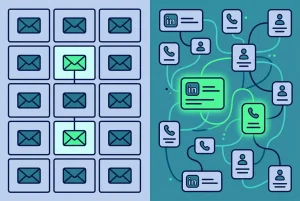
Take the example that comes up in almost every CRM we look at. A contact exists twice. One record came from a web form and has a work email address but no LinkedIn URL. The other was added by a rep from LinkedIn and has the LinkedIn URL but no email. Same person, same company. An exact email rule cannot match them, because one side has no email at all. A name rule may not either, if one record says "Kate" and the other "Katherine".
You can keep adding rules: one for LinkedIn URL, one for mobile number, one for first-initial-plus-surname. Each rule you add catches a new pattern and introduces new edge cases. Before long you are maintaining a rulebook, and the rulebook still only sees one field at a time.
The deeper reasons we covered in what fuzzy matching is and why exact-match dedup misses duplicates all point to the same conclusion. The sources that create records have multiplied: forms, enrichment tools, LinkedIn integrations, event lists, chat tools, imports. Each one fills a different set of fields, so the overlap between two records of the same person is often a single field, and not always the same one.
How AI CRM Data Matching Works Differently
AI CRM data matching does not ask "is this one field identical?" It asks "taking everything these two records contain, how likely is it they describe the same person or company?" That changes three things.
- It weighs several fields together. Email, name, company, LinkedIn URL and mobile number all contribute. A strong match on LinkedIn URL plus a similar name at the same company can outweigh a missing email.
- It tolerates variation. Nicknames, initials, typos, accents and swapped name order stop being blockers, because the comparison is about similarity, not identity.
- It handles incomplete records. Two records with no field in common can still be linked when the evidence across the fields they do have lines up.
The result is a list of probable matches with a reason attached to each one: which fields agreed, which differed and how strongly. That is the important part. A good matching system does not just say "duplicate". It shows its working so a person can check it.
For a side-by-side of the two approaches, see AI data matching vs rule-based deduplication.
Why the Shift Is Happening Now
Three things have pushed teams away from rules in the past couple of years.
Data comes from more places. The more tools write to the CRM, the more partial records you get, and partial records are exactly what rules handle worst.
Teams expect more from CRM data. Routing, scoring, attribution and forecasting all depend on one person being one record. A duplicate that splits a buying committee in two now breaks reports people make decisions on. The knock-on effects are covered in why your CRM automation keeps failing.
Matching models became practical. Comparing many fields with tolerance for variation used to need a data engineering project. It is now available as an app that connects to HubSpot or Pipedrive in minutes.
What AI Matching Should Not Do
More matches is not the goal on its own. A wrong merge combines two different people's history into one record, and that is much harder to undo than a duplicate is to leave alone. So the move to AI matching comes with a condition: a person approves the merge.
Be wary of any setup that matches probabilistically and then merges automatically. The value of AI CRM data matching is that it surfaces the duplicates rules cannot see. The value of human review is that nothing changes until someone who knows the accounts has agreed.
How EazyMatch AI Applies This
EazyMatch AI was built around multi-field matching for HubSpot and Pipedrive. For contacts it compares email address, similar names within the same company, partial name matches, LinkedIn URL and mobile number. For companies it compares LinkedIn company URL and website domain.
That is how it catches the email-only record and the LinkedIn-only record as one person when the native tools do not. The same scan flags incomplete records, gives the database a data quality score, standardises job titles and runs ICP and GDPR retention checks.
The process is the same every time:
- Connect your HubSpot or Pipedrive account
- Run the checks
- Review each suggestion, with the matched fields shown
- Approve the updates you want. Nothing syncs to the CRM without approval.
Try EazyMatch AI free →
See which duplicates your current rules have been missing.
FAQ
Q: Is AI CRM data matching less accurate than exact rules?
A: It finds more matches, and some of those are less certain than an identical email. That is why each suggestion should show which fields matched and be approved by a person before any merge.
Q: Do I need to delete my existing duplicate rules?
A: No. Exact rules are still useful at the point of entry, for example blocking a second contact with the same email on import. AI matching covers what those rules cannot see.
Q: Does AI matching work with HubSpot and Pipedrive?
A: EazyMatch AI connects to both, reads contacts and companies, and writes back only the changes you approve.
Rules Find What You Expect. Matching Finds What You Have.
Rule-based deduplication is not wrong, it is narrow. It catches the duplicates you predicted and stays blind to the ones your tools actually create. AI CRM data matching looks at the whole record, explains why two records belong together, and leaves the decision with your team. That combination is why it is becoming the default in 2026.
Want to see the difference on your own data?


