
Why Eliminating Duplicate Contacts in Pipedrive Is Crucial for Revenue Growth
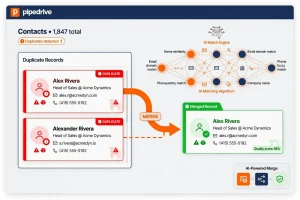
Duplicate entries in your Pipedrive CRM are more than just clutter—they undermine the accuracy of your sales data, hinder forecasting, and create operational bottlenecks for your revenue teams. Whether you’re a Sales Leader, CRM Manager, or Revenue Operations specialist, managing these duplicates is essential to maintain a single source of truth for customer information and streamline sales processes.
This article explores actionable approaches to identify, merge, and prevent duplicate contacts in Pipedrive, ensuring your sales and marketing teams have reliable data to drive revenue and improve customer engagement.
Typical Reasons Behind Duplicate Contacts in Pipedrive
Knowing how duplicates arise can help you implement preventative measures:
- - Errors during manual data entry
- - Consolidation of data from various integrations or imports
- - Company mergers combining disparate databases
- - Lack of standardised formatting for job titles and company names
- - Contacts with several email addresses or phone numbers are causing repeated entries
How EazyMatch AI Transforms Duplicate Contact Management in Pipedrive
Manual deduplication is tedious and prone to mistakes. EazyMatch AI offers an intelligent, automated solution designed to enhance your Pipedrive CRM:
- - Detects and merges duplicate contacts and organizations through advanced AI matching techniques.
- - Scores CRM data quality to help teams focus cleanup efforts where they matter most.
- - Flags contacts missing vital information such as email addresses or job titles for enrichment.
- - Standardizes job titles and company names following UK English norms.
- - Automatically reassigns open tasks to the correct merged records, preventing lost follow-ups.
- - Validates new contact entries live to block duplicates before they enter the system.
- - Integrates with trusted external databases to fill in missing contact fields.
A London-based SaaS provider slashed their duplicate contacts by 90% within one month after implementing EazyMatch AI, resulting in more transparent pipelines and accelerated deal closures.
What to Look for in CRM Deduplication and Data Quality Tools
When choosing a solution like EazyMatch AI for your Pipedrive CRM, keep these factors in mind:
- - **Seamless CRM Integration:** Ensure the tool natively connects or easily integrates with Pipedrive.
- - **High-Precision Matching:** AI-powered algorithms that minimize false positives and negatives.
- - **Automation Capabilities:** Ability to merge, delete, and update records automatically.
- - **Data Enrichment:** Access to external sources for filling gaps in contact profiles.
- - **Regulatory Compliance:** Features supporting GDPR and other data protection requirements.
- - **User-Friendly Interface:** Intuitive dashboards and reporting for ongoing data quality monitoring.
- - **Vendor Support:** Comprehensive onboarding, training, and technical assistance.
Final Thoughts: High-Quality CRM Data Powers Revenue and Efficiency
Duplicate contacts in Pipedrive can silently erode your sales effectiveness and marketing ROI. By adopting a structured approach to cleanse and enrich your CRM data—backed by AI-powered tools like EazyMatch AI—you can restore confidence in your sales pipeline, optimise team productivity, and deliver a superior customer experience.
Take the first step to transform your CRM data hygiene. [Request a demo](#) of EazyMatch AI today and discover how automated deduplication can revolutionise your Pipedrive and HubSpot environments.