Prevent Duplicates HubSpot at Entry
Every few months, someone on the team runs a cleanup. Duplicate contacts get merged, the database looks tidy for a while, and everyone moves on. Then, a few weeks later, the same names start showing up twice again. The cleanup wasn't wasted — but it also didn't fix anything, because nothing stopped new duplicates from entering HubSpot in the meantime.
If you want a database that stays clean, the goal isn't a better cleanup. It's learning how to prevent duplicate HubSpot contacts before they're created in the first place — and knowing which duplicates no setting will ever catch.
Why Cleaning Up Duplicates Once Is Never Enough
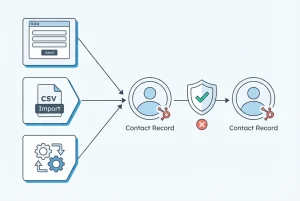
Merging duplicates is a one-time fix applied to a moving target. Contacts keep entering HubSpot every day, through channels that don't check against each other:
- A prospect fills out a demo request form using their work email
- The same person later downloads a gated asset using a personal email
- A sales rep manually adds a lead from a LinkedIn message, typing the name slightly differently
- A CSV import from an event adds hundreds of contacts, some of whom already exist
- A marketing integration syncs leads from an ad platform with only a name and a LinkedIn URL attached
Each of these is a legitimate way for a contact to be added to your CRM. None of them, on their own, causes a problem. Together, without prevention rules in place, they guarantee that duplicates will keep reappearing after every cleanup.
Where Duplicate HubSpot Contacts Actually Come From
Before you can prevent duplicate HubSpot contacts, it helps to know which entry points create the most risk:
Forms - Multiple forms across your website (demo request, newsletter signup, content download) often aren't configured to recognise a returning visitor if they use a different email address.
Imports - Bulk CSV imports from events, purchased lists, or spreadsheet handoffs between teams rarely get checked against existing records before upload.
Integrations: Ad platforms, webinar tools, and chat widgets automatically sync leads into HubSpot. Each integration typically carries only a subset of fields, and a contact created from a LinkedIn URL without an email won't match one already in HubSpot with an email address.
Manual entry - Sales reps adding contacts by hand introduce naming inconsistencies ("Mike" vs. "Michael") that HubSpot's exact-match logic won't catch.
How to Prevent Duplicates HubSpot Contacts With Native Settings
HubSpot includes several settings that reduce — though don't eliminate - the creation of new duplicates. Set these up first:
1. Turn on form deduplication
HubSpot forms automatically match new submissions against existing contacts by email address. Make sure "Always create new contact for new email address" is *not* checked if you want submissions to update existing records rather than create new ones.
2. Set unique property values
In **Settings → Properties**, mark email as a unique identifier where possible, so HubSpot flags a conflict rather than silently creating a second record.
3. Configure import matching
When importing a CSV, use HubSpot's built-in "update existing records" matching, keyed on email. This prevents the import itself from mass-creating duplicates of contacts you already have.
4. Review integration sync settings
For each connected app (ad platforms, webinar software, chat tools), check whether it matches incoming leads to existing contacts by email before creating a new record. Not all integrations do this by default.
5. Standardise data entry for your sales team
A short internal guideline — consistent name formatting, always checking for an existing record before adding a new one — reduces manual-entry duplicates significantly.
These steps meaningfully reduce the number of duplicates that enter HubSpot. They do not eliminate the hardest category.
The Duplicate HubSpot Contacts Native Prevention Won't Catch
Here's the scenario every native prevention setting misses:
Record A - created from a demo request form
- Name: Maria Chen
- Email: [email protected]
- LinkedIn URL: *(blank)*
Record B - created from a LinkedIn lead ad two weeks later
- Name: M. Chen
- Email: *(blank)*
- LinkedIn URL: linkedin.com/in/maria-chen-bl
Both records describe the same person. But HubSpot's form and import deduplication both key off email address — and Record B has none. There's no email to match against, so HubSpot creates a second contact. No setting misconfiguration caused this. The dedup logic worked exactly as designed; it simply doesn't check LinkedIn URLs or partial-name matches against the company context.
This is the type of duplicate that accumulates silently, month after month, no matter how well your form and import settings are configured.
How EazyMatch AI Prevents Duplicates HubSpot Contacts Long-Term
Native settings stop the duplicates that share an email address. EazyMatch AI is built to catch the ones that don't — using fuzzy matching across multiple fields at once:
- Email address - direct match
- LinkedIn URL - matches records like Maria Chen's even when no email overlaps
- Similar name within the same company - catches "M. Chen" against "Maria Chen" at the same domain
- Partial name match - flags abbreviated or inconsistently entered names
- Mobile number - cross-referenced across records regardless of how the contact entered your CRM
Rather than a one-time cleanup, EazyMatch AI runs ongoing checks against your HubSpot database, so new duplicates are surfaced soon after they're created — before they've had time to enter workflows, get assigned to reps, or split a contact's engagement history across two records. This is what actually prevents HubSpot automation problems downstream from creating duplicates, covered in more detail in [why CRM automation keeps failing](https://datamadeeazy.com/blog/crm-automation-duplicates/).
Nothing merges automatically. Every suggested pair shows you which fields matched and why. You approve before any changes are made in HubSpot.
FAQ
Q: Can HubSpot automatically prevent duplicate contacts?
HubSpot's native forms and import tools prevent duplicates when records share an exact email address. They do not prevent duplicates created through different sources with no shared email — such as a form-created record and a LinkedIn-sourced record for the same person.
Q: What's the difference between preventing duplicates and cleaning them up?
Cleanup addresses duplicates that already exist. Prevention configures your forms, imports, and integrations so fewer duplicates are created going forward. Both are necessary — even the best prevention settings won't catch every case, so ongoing detection still matters.
Stop the Duplicates Before They Start
Cleanup keeps your database tidy for a while. Prevention is what keeps it that way. Getting your form, import, and integration settings right is the first step to preventing HubSpot contacts from multiplying — but the records that enter through different channels, with no shared email, will keep slipping through until something matches on more than exact text.
If you haven't cleaned up your existing duplicates yet, start by learning how to find and merge duplicate contacts in HubSpot, then let EazyMatch AI keep new ones from piling up.
Connect your HubSpot account and see which new duplicates have already slipped through. No credit card required.