Ask most HubSpot users about duplicate records, and they immediately think of contacts. Company duplicates rarely come up — until a deal is logged against the wrong account, the same organisation gets enrolled in two separate campaigns, or pipeline reporting shows revenue split across two entries for the same business.
HubSpot duplicate companies are a quieter problem than contact duplicates, but the downstream impact on deal data, reporting, and account management is the same. Here is how they form, why HubSpot's native tools miss most of them, and what you can do about it.
Why HubSpot Duplicate Companies Are Hard to Catch
HubSpot does include duplicate management for companies. You can access it via **Companies → Actions → Manage duplicates**. Like its contact deduplication, it surfaces pairs of records that HubSpot considers likely matches.
The limitation is in the matching logic. HubSpot identifies HubSpot duplicate companies primarily through name similarity and, in some cases, shared website domain. That sounds reasonable until you think through how company records actually enter a CRM:
- A rep manually enters "Acme Corp" after a call. A colleague imports a prospect list that includes "Acme Corporation" — the same business, different name format.
- A company is pushed into one integration with a website domain. The same company arrives via another sync with only a LinkedIn company URL — and no website.
- A prospect rebranded last year. The old company name was entered when they were first added. A new rep entered the new name when they reopened the account.
In each of these cases, HubSpot may not flag the pair as a duplicate. The names are different enough that the fuzzy match threshold is not met. The domain and LinkedIn URL are not cross-referenced. Your CRM treats them as two separate businesses.
The Company Duplicate HubSpot Consistently Misses
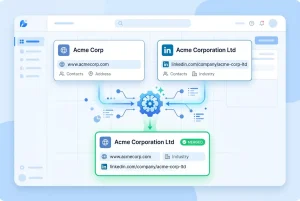
Here is the type of duplicate pair that HubSpot's native tool typically does not surface:
**Record A**
- Name: Acme Corp
- Website: acmecorp.com
- LinkedIn company URL: *(blank)*
**Record B**
- Name: Acme Corporation Ltd
- Website: *(blank)*
- LinkedIn company URL: linkedin.com/company/acme-corp
These are the same business. They share a LinkedIn company page, and the domain in Record A resolves to the same organisation. But HubSpot will not merge them, because the company names are different enough and there is no shared field it can use to make the connection.
Your CRM now has two company records for the same organisation. Any contacts, deals, and activities associated with the duplicates are split across both entries — and your account view of that business is broken.
Why HubSpot Duplicate Companies Break More Than Just Your Database
The damage caused by HubSpot duplicate companies extends well beyond untidy records:
**Contacts get split.** If a sales rep opens "Acme Corp" in HubSpot, they only see the contacts attached to that record — not the contacts sitting under "Acme Corporation Ltd". They are working with an incomplete view of the account.
**Deal data fragments.** Revenue attributed to the organisation is spread across both records. Pipeline reports show inaccurate totals. A deal review for a company shows £30K in one record and £20K in another — neither figure gives you the full picture.
**Automation fails silently.** Workflow enrolment conditions based on company properties may not fire correctly if the relevant data sits on the duplicate record rather than the one the contact is associated with.
This is not a tidiness problem. Fragmented account data directly affects how your team manages and reports on pipeline.
How EazyMatch AI Detects HubSpot Duplicate Companies
EazyMatch AI uses two matching signals specifically for company deduplication that HubSpot's native tool does not:
**LinkedIn company URL** — the most reliable unique identifier for a business. Every company has one LinkedIn URL, regardless of how its name is formatted or abbreviated across different data sources. If two HubSpot company records point to the same LinkedIn company page, they are the same business.
**Website domain** — normalised and cross-referenced across records. EazyMatch AI accounts for variations in how domains are entered ("acmecorp.com", "www.acmecorp.com", "https://acmecorp.com") and matches company records accordingly.
In the example above, EazyMatch AI would flag Record A and Record B as high-confidence HubSpot duplicate companies based on their shared LinkedIn URL — the one field that definitively identifies the organisation, regardless of how the name was recorded.
How It Works: Four Steps to Clean Company Data
EazyMatch AI is built so that no changes reach your CRM without your explicit approval.
Step 1 — Connect HubSpot
Connect your portal to EazyMatch AI in minutes. No technical configuration required.
Step 2 — Run checks
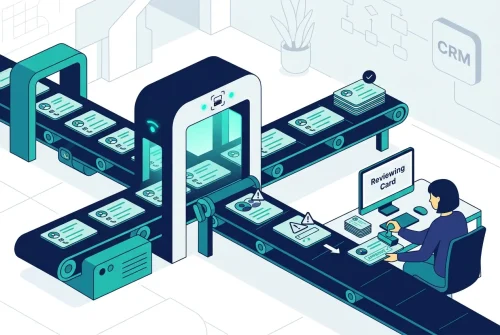
EazyMatch AI scans your company records, applying LinkedIn URL and website domain matching across your entire database. Duplicate pairs are surfaced with a confidence score and matched fields highlighted.
Step 3 — Review suggestions
You see exactly why each pair was flagged — shared LinkedIn URL, matching domain, or both — before making any decision.
Step 4 — Approve updates
Approved merges are pushed back to HubSpot. All associated contacts, deals, and activities from both records are consolidated under the merged company. Nothing changes without your sign-off.
→ Need help connecting? See the [HubSpot setup guide](https://datamadeeazy.com/hubspot-setup-guide/).
Beyond Companies: A Full Data Quality Picture
HubSpot duplicate companies are often a symptom of wider data quality issues across the CRM. EazyMatch AI also runs checks for:
- Contact duplicates - matching across email, name, LinkedIn URL, and mobile number
- Incomplete records - companies missing key fields like website, LinkedIn URL, or industry
- Data quality scoring - each record is scored so you can prioritise which accounts need attention
- GDPR / data retention flags - records that may require review under your retention policy
All checks run in one place, giving you a single picture of your CRM data quality rather than addressing one problem at a time.
FAQ
Q: Does HubSpot have a native company deduplication tool?
HubSpot includes duplicate management for companies under the Companies menu. It identifies likely matches based on name similarity and, in some cases, shared domain. The limitation is that it does not cross-reference LinkedIn company URLs — meaning many duplicates that differ in name formatting, completeness, or data source are not surfaced.
Q: What happens to contacts and deals when HubSpot companies are merged?
When two company records are merged in HubSpot, all associated contacts, deals, notes, calls, meetings, and tasks from both records are consolidated under the merged company. No data is lost. EazyMatch AI applies the same principle — all associations are retained after a merge is approved.
**Q: Can EazyMatch AI also deduplicate HubSpot contacts?**
Yes. EazyMatch AI handles both contact and company deduplication in the same platform. For contacts, it matches across email address, name, LinkedIn URL, mobile number, and partial name — catching duplicates that HubSpot's native tool misses. [Read the full guide to HubSpot contact deduplication →](/hubspot-duplicate-contacts)
Fix the Company Records, Then Trust Your Pipeline
Most pipeline accuracy problems in HubSpot do not start in the deal records — they start in the company records that sit beneath them. HubSpot duplicate companies fragment account data, split contact ownership, and produce inaccurate reports that are hard to diagnose without looking at the underlying CRM data.
EazyMatch AI surfaces those duplicates, matches them using LinkedIn URL and website domain — not just company name — and puts every merge decision in your hands.
Also running Pipedrive? The same company duplicate problem exists there. Learn how it affects your pipeline in the Pipedrive data quality guide →.
Connect your HubSpot portal and see your full company duplicate picture in minutes. No credit card required.