
The workflow was built correctly. The enrolment trigger is right. The sequence of steps is in the right order. And yet the same contact just received two identical emails in the same afternoon — or the same lead somehow ended up on two reps' task lists simultaneously.
When this happens, the instinct is to dig into the workflow logic. Adjust the enrolment criteria. Add a suppression condition. Rebuild the sequence. But the logic is usually not the problem.
CRM automation duplicates are.
The Real Reason Your CRM Automation Keeps Failing
Automation tools in HubSpot and Pipedrive work on a simple principle: a record meets a condition, a trigger fires, an action runs. Clean data makes this reliable. Duplicate records make it unpredictable.
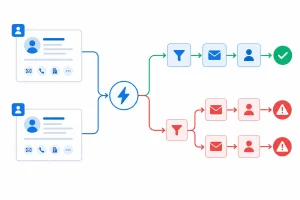
When the same contact or company exists as two separate records in your CRM, both records are visible to your automation. If both meet the enrolment criteria for a workflow, both get enrolled. The automation fires twice — not because the logic is wrong, but because your data tells it there are two separate people to act on.
This is the core problem with CRM automation duplicates: your workflows are behaving exactly as designed. The data they are running on is not.
Three Automation Failure Patterns Caused by CRM Automation Duplicates
The impact of duplicate records on CRM automation is predictable. These are the patterns that are most common and most damaging:
Email sequences firing twice
A contact exists in your CRM as two records — one with a work email, one with a personal email. Both records meet the sequence enrolment trigger. The contact receives the same email twice, from the same sender, minutes apart. From their perspective, something has gone wrong with your system. From your team's perspective, the workflow looks fine.
Leads routed to the wrong rep — or two reps
Lead assignment rules run against every matching record. If a duplicate contact exists and both records meet the assignment criteria, the lead can be routed to two reps simultaneously. Neither rep knows about the other. Both make contact. The prospect experiences a disorganised, duplicated outreach — and your CRM records two separate engagement activities for the same person.
Lifecycle stage changes triggering multiple times
A contact moves from MQL to SQL. The lifecycle stage change fires a workflow that sends a notification to the deal owner and updates a property. But the duplicate record also has its stage updated, which fires the same notification again. Your deal owner receives two alerts for the same conversion event. Your reporting shows two stage-change events for one person.
In each case, the symptom is a workflow firing too many times. The root cause is always the same: CRM automation duplicates the same trigger.
Why This Is Harder to Diagnose Than It Looks
CRM automation failures caused by duplicates do not produce obvious errors. The workflow does not fail. The sequence does not throw an error. Everything appears to have executed correctly — because it did, twice.
The signs are indirect:
- A contact tells you they received the same email twice
- A deal appears in two reps' pipelines
- Lifecycle stage change reports show an unexpected spike
- A suppression list that should have caught someone did not, because it was checking against one record while the other was enrolled
Without looking at the underlying contact and company records, these problems look like workflow misconfiguration. Teams spend hours adjusting trigger logic and adding suppression conditions that treat the symptom — without touching the duplicate data that is causing it.
Duplicate Records Are a Data Problem, Not a Workflow Problem
The instinct to fix CRM automation failures by adding more workflow logic makes the problem worse over time. Each workaround adds complexity. Suppression lists grow. Enrolment conditions become harder to maintain. The underlying duplicate records continue to accumulate.
The sustainable fix is to clean the data first.
Once the duplicate contacts and companies are removed, the automation logic works as intended — because each person and each business exist as a single record. One trigger event. One workflow run. One rep assigned. One email sent.
How EazyMatch AI Fixes the Root Cause
EazyMatch AI identifies and removes the duplicate records that cause CRM automation duplicates to fire incorrectly.
For contacts, it matches across:
- Email address, including partial matches and domain variants
- Similar name at the same company - catches "Jon" vs "Jonathan" at the same organisation
- Partial name match - identifies abbreviated or misspelt entries across records
- LinkedIn URL - the most reliable unique identifier for a professional contact
- Mobile number - flags records where the same number appears against two separate contacts
For companies, it matches on:
- LinkedIn company URL - catches the same business entered under different name formats
- Website domain - normalised to account for format variations
This multi-field matching catches the duplicates that HubSpot and Pipedrive's native tools miss — the records that share a LinkedIn URL but not an email, or a company name variant but not an exact domain match. These are exactly the records that the CRM automation duplicates flow from.
How It Works: Four Steps
EazyMatch AI is built so that nothing changes in your CRM without your explicit approval.
Step 1 — Connect your CRM
Connect HubSpot or Pipedrive to EazyMatch AI. Setup takes minutes and requires no technical configuration.
Step 2 — Run checks
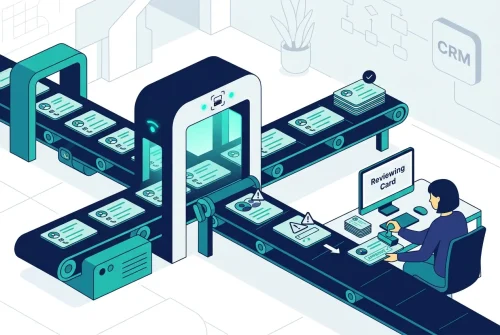
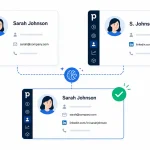
EazyMatch AI scans your contacts and companies, applying multi-field AI matching across your entire database. Duplicate pairs are surfaced with a confidence score, and the matched fields are highlighted.
Step 3 — Review suggestions
You review each flagged pair and see exactly why it was flagged before making any decision. Approve, dismiss, or defer — the choice is always yours.
Step 4 — Approve updates
Approved merges sync back to your CRM. All associated deals, notes, activities, and engagement history from both records are retained. Once the duplicate is removed, your automation has one record to act on - and it fires correctly.
FAQ
Q: How do I stop HubSpot from enrolling duplicate contacts in workflows?
The reliable fix is to remove the duplicate contacts, not to add more suppression logic. Suppression lists check against a single record — if the duplicate is in a different list or was created after the suppression was set up, it will still be enrolled. Cleaning the duplicate data with EazyMatch AI removes the problem at source.
Q: Why is my HubSpot sequence sending emails twice to the same person?
This almost always means the contact exists as two separate records in HubSpot - both meeting the enrolment criteria. Check whether the same email address, name, or LinkedIn URL appears under more than one contact record. EazyMatch AI can run a full scan and surface all duplicate pairs across your contacts database, including those without a shared email address.
Fix the Data. Then Trust the Automation.
CRM automation is only as reliable as the data it runs on. When CRM automation duplicates are present, every workflow that touches contact or company records can fire twice - not because it is misconfigured, but because the data tells it to.
The fix is not a better suppression list. It is a clean CRM.
EazyMatch AI surfaces duplicate contacts and companies using multi-field AI matching, catches the records that native deduplication tools miss, and puts every merge decision under your control before anything changes in your CRM.
Already clean on contacts? Make sure your company records are, too. Read the guide to HubSpot duplicate companies →
Connect your HubSpot or Pipedrive account and see your full duplicate picture in minutes. No credit card required.