
Duplicate records accumulate in every CRM. The question is not whether you have them — it is how many, how complex, and whether your chosen tool can actually find them.
Most CRM platforms include some form of native duplicate detection. All of them share the same core limitation: they match on name and email, and nothing else. That means any duplicate where the email fields differ — a contact entered twice from different data sources, a company record created across two integrations with slightly different names — stays in your database undetected.
This comparison covers the best CRM deduplication tool options available in 2026 for teams running HubSpot or Pipedrive: what each one does, where it falls short, and which is the right fit depending on your situation.
What Makes the Best CRM Deduplication Tool?
Before comparing specific tools, it helps to define what separates a genuinely effective best CRM deduplication tool from a basic name-and-email matcher.
Multi-field matching - Can the tool cross-reference LinkedIn URL, mobile number, and partial name variants alongside email and full name? The more fields matched, the more duplicates were caught.
AI or fuzzy matching - Rule-based tools apply fixed logic. AI-driven tools apply probabilistic scoring across fields, catching near-matches that exact rules would miss. See the full explainer on fuzzy matching vs exact-match deduplication
CRM compatibility - Some tools are built for a single CRM. If you run HubSpot and Pipedrive in parallel, or are planning a CRM migration, this matters more than it seems.
Human-in-the-loop review - A tool that auto-merges without review is a risk. The best deduplication tools surface matches and require human approval before any changes reach the CRM.
Company record deduplication - Contact deduplication is table stakes. Company (account) deduplication is harder and often overlooked. If your CRM has fragmented company records, make sure the tool addresses both layers.
The Tools: An Honest Comparison
EazyMatch AI
Supported CRMs: HubSpot, Pipedrive
EazyMatch AI is built specifically for deduplication in HubSpot and Pipedrive. It applies multi-field AI matching across both contact and company records, catching the duplicate pairs that native tools and simpler rule-based tools miss.
The key scenario it handles:
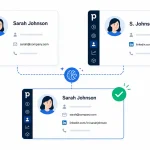
A contact exists twice in the CRM — once with an email address but no LinkedIn URL, and once with a LinkedIn URL but no email. These are the same person. HubSpot and Pipedrive native tools will not flag this pair because there is no exact email match. EazyMatch AI detects it by cross-referencing LinkedIn URLs and names simultaneously.
Contact matching fields: email address, similar name within the same company, partial name match, LinkedIn URL, mobile number
Company matching fields: LinkedIn company URL, website domain
Additional features beyond deduplication:
- Missing data detection - incomplete contacts and companies are flagged automatically
- Data quality scoring — each record is scored so you can prioritise which accounts to clean first
- Job title standardisation
- ICP (ideal customer profile) checks
- GDPR / data retention flags - records that may need review under your retention policy
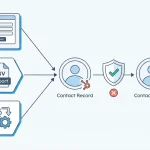
Human review: Every suggested merge requires explicit approval before it reaches the CRM. Nothing is applied automatically.
Best for: Teams running HubSpot or Pipedrive who need AI-matched deduplication across both contacts and companies, with full control over every merge decision.
Dedupely
Supported CRMs:** HubSpot (primary focus)
Dedupely is a deduplication tool built around HubSpot. It identifies duplicate contacts and companies based on configurable matching rules and presents pairs for manual review. Teams looking for a straightforward HubSpot-focused workflow will find it easy to set up and use.
Where it fits:** Dedupely works well when duplicates are relatively well-formed — matching names, shared email domains, or similar company names. It is a solid starting point for HubSpot databases, where the duplicate problem is mostly records that were simply entered more than once.
Where to consider alternatives:** As the database grows and data sources multiply (imports, integrations, form submissions with partial data), the rule-based matching requires more configuration. Teams that need Pipedrive support, or whose duplicates involve partial fields and missing data, may find the matching logic needs supplementing with a tool that applies AI-driven cross-field matching.
For a deeper side-by-side matching approach, pricing philosophy, and what changes if you switch, see the detailed 2026 Dedupely alternative comparison.
Insycle
**Supported CRMs:** HubSpot, Salesforce, Pipedrive (and others)
Insycle is a broader CRM data management platform that includes deduplication, as well as data cleaning, normalisation, and transformation. It supports more CRMs than most dedicated deduplication tools and offers granular control over matching and merge rules.
Where it fits: Insycle suits RevOps teams or CRM administrators who want a single platform for data quality across multiple CRM environments. The configurability is extensive, and the breadth of features goes well beyond deduplication alone.
Where to consider alternatives: The feature breadth comes with a steeper learning curve and a higher price point. Teams who specifically need CRM deduplication — rather than a full data management suite — may find it more than they need. The matching logic is rule-based rather than AI-driven, which means more setup is required to catch complex or partial-match duplicates compared to tools that apply probabilistic scoring out of the box.
Head-to-Head Comparison
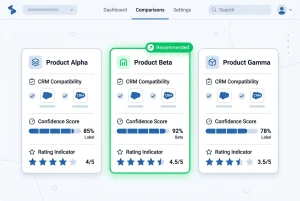
| Feature | EazyMatch AI | Dedupely | Insycle |
|---|---|---|---|
| HubSpot | ✓ | ✓ | ✓ |
| Pipedrive | ✓ | ✗ | ✓ |
| AI / Fuzzy Matching | ✓ | Partial | ✗ (Rule-based) |
| LinkedIn URL Matching | ✓ | ✗ | ✗ |
| Company Deduplication | ✓ | ✓ | ✓ |
| Data Quality Scoring | ✓ | ✗ | Partial |
| Human Review Required | ✓ | ✓ | ✓ |
| GDPR / Retention Flags | ✓ | ✗ | ✗ |
| Missing Data Detection | ✓ | ✗ | Partial |
Which Tool Is Right for Your Team?
You run HubSpot and have a relatively clean, growing database:** Dedupely is a straightforward starting point. It covers the common cases and is quick to set up.
You run HubSpot or Pipedrive and have accumulated data quality problems beyond simple duplicates:** EazyMatch AI is built for this. Multi-field AI matching across both contacts and companies, with data quality scoring and GDPR flagging included alongside deduplication. The [real cost of duplicate CRM data](https://datamadeeazy.com/blog/cost-bad-crm-data/) illustrates how far this problem typically extends in a CRM that has grown through multiple data sources.
You run multiple CRMs and need a full data management platform:** Insycle is worth evaluating, particularly if data normalisation and transformation are also on your list. Be aware of the learning curve and the time required to configure matching rules for complex duplicate patterns.
You are looking for the best CRM deduplication tool that catches partial-match duplicates — the ones where two records represent the same person but share no exact matching fields — EazyMatch AI's AI matching is the approach designed for this. For a deeper look at how AI matching compares to rule-based logic, see AI data matching vs rule-based deduplication →.
FAQ
Q: What is the best free CRM deduplication tool?
Both HubSpot and Pipedrive include basic native deduplication at no extra cost. These tools catch exact email matches and close name matches. For partial-match duplicates — which are often the majority in a real-world CRM — a dedicated tool is needed. EazyMatch AI offers a free trial with no credit card required.
Q: Can I deduplicate both contacts and companies in the same tool?
Yes. EazyMatch AI, Dedupely, and Insycle all support company deduplication alongside contacts. EazyMatch AI uses LinkedIn company URL and website domain as matching signals for companies — catching duplicates that name-only matching misses. [See how company deduplication works in HubSpot →](https://datamadeeazy.com/blog/hubspot-duplicate-companies/)
Q: Is it safe to run deduplication on a live CRM?
With any reputable tool, yes — provided it requires human approval before applying changes. EazyMatch AI, Dedupely, and Insycle all surface suggestions for review. Nothing is pushed to your CRM without sign-off.
Q: How is EazyMatch AI different from Dedupely?
The primary difference is in matching logic and CRM coverage. EazyMatch AI applies AI-driven multi-field matching — including LinkedIn URL, partial name, and mobile number — and supports both HubSpot and Pipedrive. Dedupely focuses on HubSpot and uses configurable rule-based matching. For a detailed breakdown, see the [Dedupely alternative comparison →](https://datamadeeazy.com/blog/dedupely-alternative/).
The Right Tool Starts with Understanding the Problem
The best CRM deduplication tool for your team depends on where your duplicates come from and how complex they are. If they are mostly well-formed records from a single data source, a rule-based tool will handle them. If they come from multiple integrations, imports, and manual entry — with partial fields, name variants, and missing email addresses — you need matching logic that works across fields simultaneously, not just within them.
EazyMatch AI is built for the latter. Connect your HubSpot or Pipedrive account and run your first scan to see exactly what your database contains.
No credit card required. See your full duplicate picture in minutes.
Want to compare specific features before signing up? View pricing →


