
Clean CRM Data Migration for M&A Deals
When two companies merge, someone eventually has to answer the question of what happens to two separate CRMs. Sometimes it is two HubSpot portals. Sometimes it is a HubSpot instance and a Pipedrive instance. Either way, the same customers, prospects, and partners often exist in both systems, entered independently by two sales teams who had no idea the other record existed.
A standard CRM migration is complicated enough. Merging two live, independently maintained databases into one adds a layer that a single-source migration does not have to deal with: duplication across systems, not just within one.
Why Merging Two CRMs Is Different From a Standard Migration
A typical clean CRM data migration moves one dataset from an old system into a new one. The duplicate problem is contained to a single source - contacts entered twice within the same CRM over time.
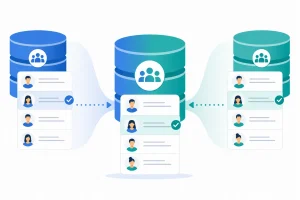
A merger changes the starting conditions. You are combining two independently built databases, each with its own history of imports, integrations, and manual entry habits. The same prospect who has been in conversation with both companies before the merger will very likely exist in both CRMs, usually with different levels of completeness, different notes, and sometimes different deal stages entirely.
This is a materially harder deduplication problem than a single-source migration, and it needs a different first step: cross-system matching before either dataset is touched.
Step 1: Audit Both Databases Independently First
Before combining anything, run a standalone audit of each CRM. Identify:
- Existing duplicates already present within each system, before the merge adds more
- Fields each system tracks that the other does not (custom properties, lifecycle stages, lead scoring models)
- Data quality baseline for each — completeness, formatting consistency, GDPR and retention status
Cleaning each database individually first means you are not trying to solve within-system duplicates and cross-system duplicates in the same pass. It also gives you a clear before-and-after comparison once the merge is complete.
Step 2: Find Cross-System Duplicate Contacts and Companies
This is the step a standard migration checklist does not cover. The same contact may exist in System A with a work email address and no LinkedIn URL, and in System B with a LinkedIn URL and a personal email, entered by a rep who met them at an event. Exact-match tools comparing the two systems on email alone will miss this pair entirely, even though it is obviously the same person once a human looks at both records side by side.
The same applies to companies. "Northbridge Consulting" in one CRM and "Northbridge Consulting Ltd" in the other, both tied to real deal history, need to be identified as the same organisation before deal and revenue data from both sides can be trusted post-merge.
Step 3: Decide Which Record Wins - and Document Why
For every cross-system duplicate identified, someone needs to decide which record becomes the surviving one, and what happens to the data on the record that gets merged away. In a merger context, this is not purely a data question — it often has commercial implications, since deal ownership, account history, and relationship context can differ meaningfully between what each company's team recorded.
Set a clear rule before you start reviewing pairs: for example, the record with more recent activity becomes the primary record, but notes, deal history, and attachments from both records are preserved on the merged record. Document the rule so reviewers apply it consistently across a large queue of matches.
Clean CRM Data Migration Before the Combined Import
Once cross-system duplicates are identified and resolved, the combined dataset still needs the same clean CRM data migration steps any single-source move requires: missing fields filled or flagged, job titles standardised across both companies' different conventions, and GDPR or retention status reviewed for contacts that may now fall under a different legal basis post-merger.
Doing this after the systems are combined is significantly harder, because you have lost the ability to easily tell which records came from which original system, and any remaining cross-system duplicates are now indistinguishable from single-source duplicates in the combined data.
Step 5: Reconcile Deal and Pipeline History
Where a duplicate contact or company had open or closed deals recorded in both source systems, reconcile that history onto the surviving record before reporting on the combined pipeline. Leaving deal history split across two now-merged-in records will distort forecasting and revenue reporting for the newly combined organisation from day one — the same effect described in how duplicate CRM data skews sales forecasting, compounded by the fact that a merger typically doubles the review workload.
How EazyMatch AI Supports Merger-Driven Deduplication
EazyMatch AI connects to HubSpot or Pipedrive and runs multi-field AI matching across contacts and companies — email address, similar name within the same company, partial name match, LinkedIn URL, and mobile number for contacts, and LinkedIn company URL and website domain for companies.
For a merger, the practical approach is to run EazyMatch AI on each system separately first, resolving within-system duplicates, then run it again on the combined dataset once both systems have been imported into a single CRM. Because matching does not rely on exact email alone, it catches the specific case that makes cross-system mergers hard — the same contact entered with different, non-overlapping fields in each original system.
Every match goes through a review queue with the matched fields and confidence score visible. Nothing merges automatically, which matters in a merger context, where an incorrect automatic merge could combine two people from different companies who happen to share a name.
Step 1: Connect each CRM (before or after combining, depending on your migration order)
Step 2: Run checks across contacts and companies
Step 3: Review the queue of cross-system and within-system duplicates
Step 4: Approve updates - changes only apply once you sign off
Try EazyMatch AI free →
Run a check on either system before your merger migration begins. No credit card required.
FAQ
Q: Should we clean each CRM before or after combining them?
A: Before, where possible. Cleaning each system independently first removes within-system duplicates and establishes a quality baseline, making the subsequent cross-system matching step much more manageable.
Q: What if the two CRMs use different platforms, like HubSpot and Pipedrive?
A: EazyMatch AI connects to both. You can run checks on the HubSpot and Pipedrive instances separately before deciding which platform the combined organisation will standardise on.
Q: How do we handle deals owned by different sales teams for the same account?
A: Resolve the contact and company duplicate first, then reconcile deal ownership as a separate step with input from both sales teams — the data cleanup surfaces the overlap, but ownership decisions are a business call, not a data one.
Start the Merge With a Clean Baseline
A CRM merger is not simply a bigger migration. It is two histories of data entry colliding, and the duplicates it creates are structurally different from the ones a single-source clean CRM data migration deals with. Finding them before the systems combine is the difference between a merged CRM the new organisation can trust, and one that carries two companies' worth of unresolved duplicates into year one.
Try EazyMatch AI free →
Get a clear picture of both databases before you decide how to combine them.