

CRM Data Deduplication Best Practices
January: the RevOps team spends two weeks merging duplicates, filling in blank job titles and archiving contacts nobody has touched since 2022. February: the dashboards look great. April: one webinar import, two new SDRs and a purchased event list later, the duplicate count is right back where it started.
The cleanup wasn't wrong. It just wasn't a system. Data quality that depends on someone finding a free fortnight will always decay faster than it gets fixed, because new records arrive every day and cleanup sprints arrive once or twice a year.
Automating CRM data quality is how RevOps teams break that cycle. But "just automate it" is also where a lot of teams get into trouble, either by automating the wrong things or by letting a tool write changes straight into the CRM with nobody checking. This guide covers what to automate, what to keep human, and how to set it up so the data stays clean between cleanups.
Why Manual Data Quality Work Doesn't Scale
Poor data quality is expensive. Gartner estimates it costs organisations an average of $12.9 million per year ("How to Improve Your Data Quality," Gartner, 2021). Very little of that comes from one big mistake. It comes from small problems compounding: a duplicate contact enrolled in two sequences, a company split across two owners, a deal attached to the wrong version of an account.
Manual work struggles to keep up for three reasons:
- Volume. Every form fill, import, integration sync and manual entry is a fresh chance to create a bad record. A person reviewing records one by one can't keep pace with a database that grows every day.
- Consistency. Two ops people will make different merge calls on the same pair of records. Without written rules applied the same way every time, the database drifts toward whoever did the last cleanup.
- Visibility. Without a recurring check, nobody knows quality is slipping until a campaign misfires or a forecast lands badly off.
What to Automate and What to Keep Human
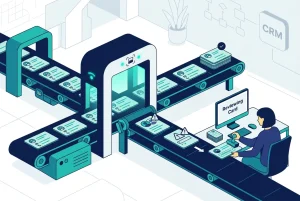
The most common mistake is treating automation as all or nothing. In practice, data quality work splits cleanly into two jobs: finding problems and fixing them.
Automate the detection. Scanning thousands of records for duplicates, blank fields, inconsistent job titles and stale contacts is repetitive, pattern-driven work. Software does it faster and more consistently than people, and it runs on a schedule instead of whenever someone remembers.
Keep the decisions human. Merging two records is hard to undo. Deleting a contact for retention reasons has compliance consequences. Deciding which owner or lifecycle stage wins in a merge often needs context no algorithm has. These calls belong in a review queue, approved by a person before anything changes in the CRM.
That split sits underneath all sensible CRM data deduplication best practices: machines surface, people decide. Fully automatic merging looks efficient right up until it combines two different people who share a name at the same company, and someone has to rebuild the activity history by hand.
Turning CRM Data Deduplication Best Practices Into Automation
If you already follow the core CRM data deduplication best practices (clear match rules, a defined master record, named ownership), automation is the layer that keeps them running without a calendar reminder. Here is how to translate each one.
1. Match on more than email
Most automated dedup setups inherit the CRM's native logic, which keys on an exact email match. That catches the easy duplicates and misses the ones that do the most damage.
Take a common case. One record for a contact has an email address but no LinkedIn URL, created from a form fill. A second record for the same person has a LinkedIn URL but no email, created by an SDR prospecting on LinkedIn. HubSpot and Pipedrive native tools will not flag this pair, because there is no shared email to match on. An automated check built on email alone won't flag it either, no matter how often it runs. Detection needs to cross-match on name, company, LinkedIn URL and phone number. For the mechanics, see how fuzzy matching works in a CRM.
2. Run checks on a schedule, not after a crisis
Weekly checks suit most teams with active inbound. Monthly works for smaller or slower-moving databases. Either way, also run a check straight after any large import, event list upload or new integration, since those are the moments duplicates arrive in bulk.
3. Score data quality, don't just count duplicates
Uniqueness is one dimension. Completeness, consistency and accuracy matter just as much for routing and segmentation. A recurring CRM data quality score gives RevOps a trend line to report on, and makes it obvious when a new lead source starts dragging the numbers down.
4. Standardise the fields that drive segmentation
"VP Sales", "Vice President of Sales" and "VP, Sales" are the same role, but a list filter only catches one of them. Job title standardisation is a strong candidate for automated suggestions: the pattern is repetitive and the payoff shows up immediately in targeting and ICP scoring.
5. Flag retention and compliance risks
Under GDPR, personal data should be kept no longer than necessary for the purpose it was collected (Article 5(1)(e), the storage limitation principle). An automated check can flag contacts that have passed your retention window, but deletion should stay a human decision, recorded against your policy.
6. Route every change through one review queue
Suggestions should land in one place where an owner approves or rejects them. That gives you an audit trail, keeps accountability clear, and stops well-meaning automation from quietly rewriting records.
Where Native Workflows Fall Short
HubSpot and Pipedrive both offer workflow automation, and it's useful for routing, notifications and property updates. For data quality it has a hard limit: workflows act on properties that already exist and already match. They can't recognise that two records with no shared field describe the same person.
That's why teams that build dedup entirely inside native workflows (see setting up automated deduplication in HubSpot workflows) usually end up with fewer exact duplicates and the same backlog of cross-field duplicates they started with.
How EazyMatch AI Automates the Detection, Not the Decisions
EazyMatch AI is built around the split described above. It connects to HubSpot or Pipedrive, runs checks across your contacts and companies, and puts every suggested fix into a review queue. Nothing syncs back to your CRM until someone approves it.
For contacts, it uses multi-field AI matching across email address, similar name within the same company, partial name match, LinkedIn URL and mobile number. That's what connects the email-only record and the LinkedIn-only record as the same person. For companies, it matches on LinkedIn company URL and website domain.
The same checks also cover:
- Missing data detection for incomplete contacts and companies
- Data quality scoring you can track over time
- Job title standardisation to clean up segmentation fields
- ICP checks to spot records that don't fit your target profile
- GDPR and data retention flags for contacts past your retention window
Step 1: Connect your CRM (HubSpot or Pipedrive)
Step 2: Run checks
Step 3: Review suggestions
Step 4: Approve updates - changes only reach your CRM after human approval
Try EazyMatch AI free →
Run your first automated data quality check in minutes.
FAQ
Q: Should CRM merges ever be fully automatic?
A: For most teams, no. Detection can be fully automated, but merges and deletions are hard to reverse and often need context, so they should go through a human approval step.
Q: How often should automated data quality checks run?
A: Weekly is a good default for teams with steady inbound volume, plus an extra check after any large import or new integration.
Q: Can I automate deduplication with HubSpot or Pipedrive workflows alone?
A: Partly. Workflows handle exact-match duplicates and routing well, but they can't match records that share no common field, such as an email-only contact and a LinkedIn-only contact for the same person.
Build a System, Not Another Cleanup Sprint
The teams that keep their CRM clean aren't doing bigger cleanups. They're running smaller checks all the time, with detection automated and decisions kept human. Put CRM data deduplication best practices on a schedule, match on more than email, and make every change pass through a review queue, and the April relapse stops happening.
Want help designing the right cadence for your team?


